Monitor
In this section, you can view the history and monitor conversations carried out through the platform.
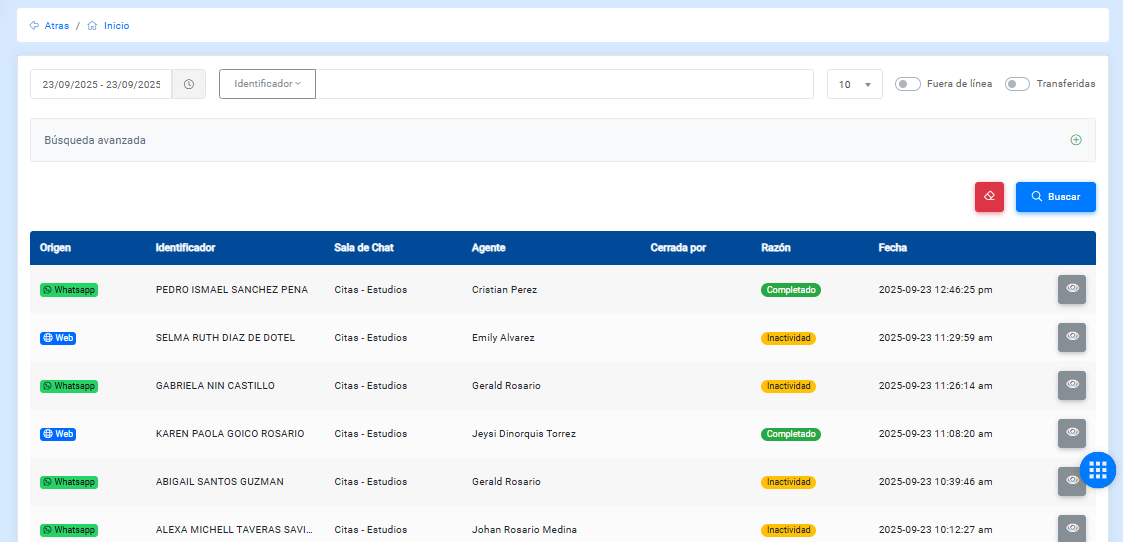
The following table describes the history fields:
- Offline: shows conversations that are not online. If enabled, it shows online conversations managed by agents.
- Transferred: filters conversations that were transferred.
- Origin: shows where the conversation with the bot started.
- Identifier: corresponds to any variable used within the flow.
- Chatroom: shows the chatroom where the conversation took place.
- Agent: person with whom the user communicated, if the conversation was handled by an agent.
- Closed by: shows the name of the user who closed the conversation.
- Reason: shows the reason why the conversation ended.
- Feedback: user opinion about the conversation.
- Date: date when the conversation started.
- Options: allows you to view the conversation history.
This section includes two controls:
- Disconnected: shows conversations that are active.
- Transferred: shows conversations that were transferred.
This view also includes a search field to filter by the conversation identifier.
Advanced search
You can perform a more precise filter using this section.
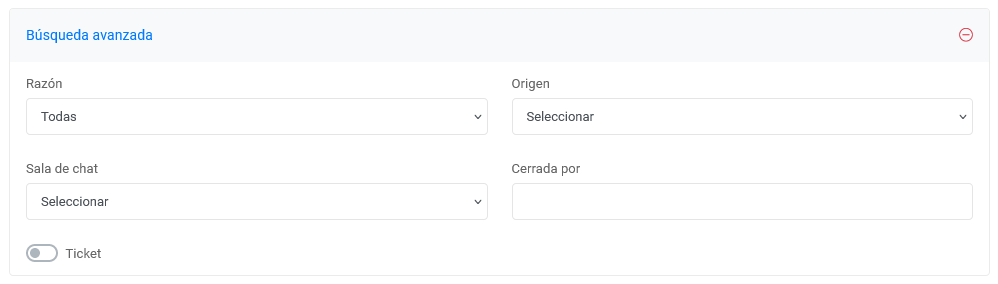
This section displays the following fields:
- Reason: allows you to select the reason why the conversation ended. These can be:
- Inactivity
- Completed
- Command
- Agent
- Web user
- Supervisor
- Origin: shows where the conversation with the bot originated. Currently, the conversation origin can be:
- Web Client
- Closed by: allows you to indicate who closed the conversation, if it was closed by an administrator.
- Date range: displays a date range that can be modified to query the data for the period selected by the user.
Considerations
To view previous records, go to the end of the table and navigate through the history using the arrows located in the lower-right corner.