Variables
In this section, you can view, create, and modify the Variables that the bot will use through a table containing the following columns:
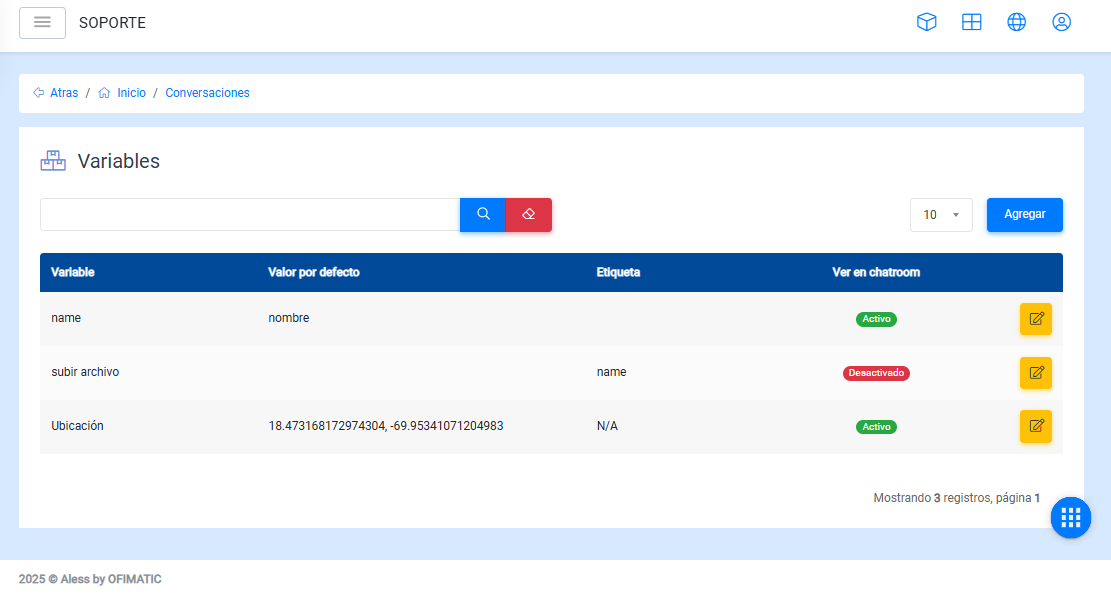
- Variable: displays the variable name.
- Value: displays the value assigned to the variable.
- Label: displays the label with which the variable was saved.
- Show in chatroom: indicates whether the variable will be visible in the chatroom.
- Options: allows you to edit or delete variables.
Considerations
In the table, you can:
-
Find a variable using the
Searchoption, located below the upper-left corner. -
Modify the number of items displayed per page.
Options
Add and edit
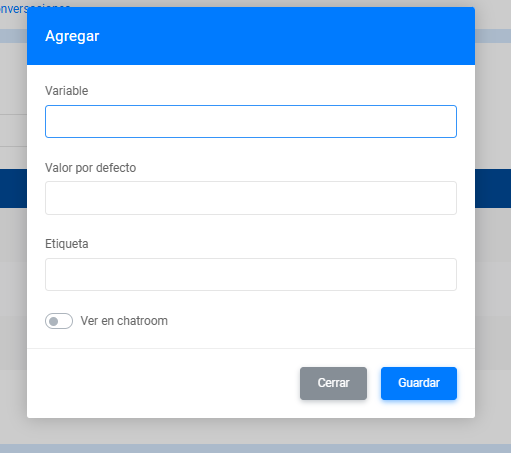
- Variable: allows you to enter the name you want to assign to the variable.
- Default value: allows you to enter the default content of the variable.
- Label: indicates the name or label that will identify the variable.
- Show in chatroom: indicates whether the variable will be visible to agents in the chatroom.
Considerations
- To add a script, you must place an
@in the default value. - To add a file, you must place a
#in the default value.