Messages
Messages in Aless are one of the most important parts of scripts, since they correspond to the texts that users will read during the conversation.
By combining them according to your needs, you can design a conversation sequence that will help Aless provide information to your customers and offer a solution. This conversation flow can be changed at any time, depending on its performance.
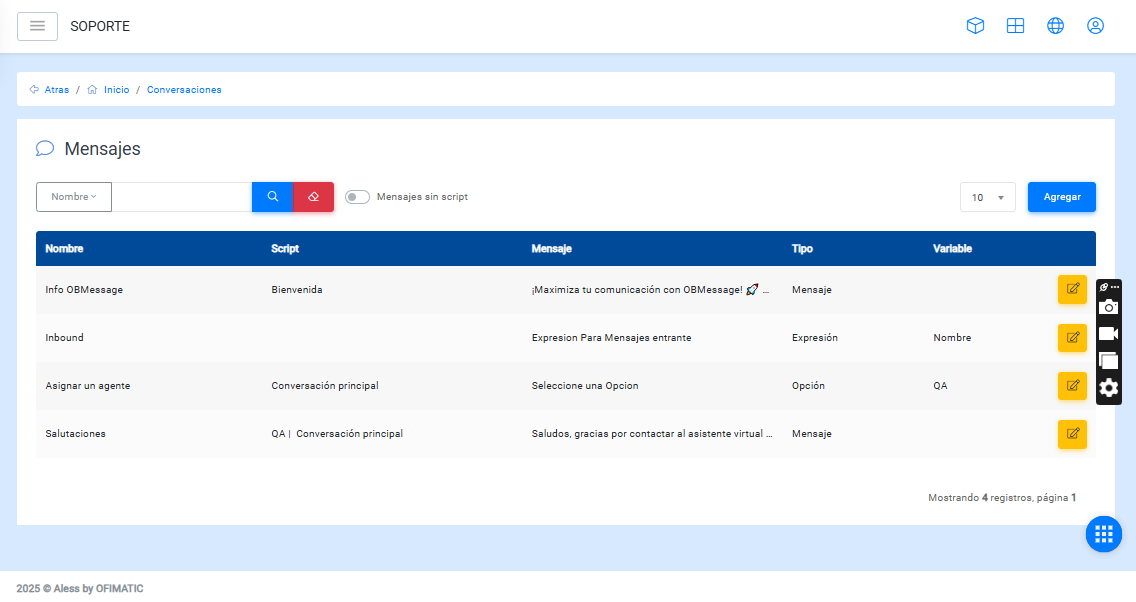
Search
You can search by any of the following fields:
- Script
- Name
- Message
- Type
You can also apply a filter to search for messages that are not associated with a script.
Message management
In this section, you can view, create, and modify the messages that the bot will use through a table containing the following columns:
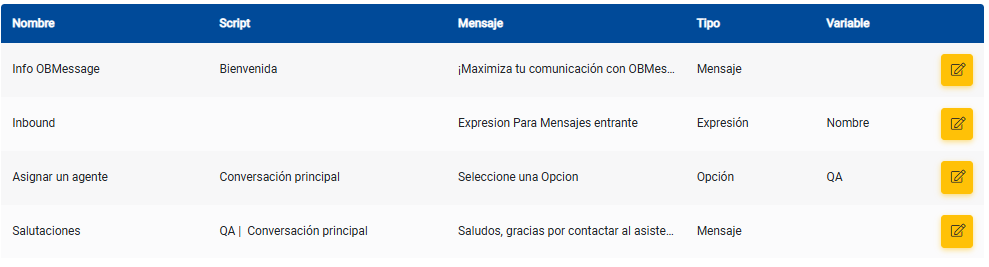
- Name: displays the message name.
- Script: displays the name of the script this message is related to.
- Message: displays part of the message content.
- Type: displays the message type.
- Variable: indicates which variable will store the user’s response to that message.
- Options: allows you to access the edit messages option.
Considerations
In the table, you can:
-
Find a message using the
Searchoption, located below the upper-left corner. -
Modify the number of items displayed per page.